
主張:你的 agent 不需要在每次開口前把整套百科全書塞進 context——它只需要知道「這個知識存在」,等真的用到再去讀。
讀完能做到:把一組工具與說明文件包裝成 Skill 掛到 agent 上,並親眼看到 skill 的指令與工具是「被觸發之後」才進到模型面前的。
Day 10 講過 Context Compaction——對話長了就壓縮。Day 11 講過 Context Caching——重複的內容快取起來省錢。今天的主題是同一個家族的問題,但角度不一樣:如果你的 agent 要支援二十種不同的專業能力(處理 BigQuery 查詢優化建議、填寫特定格式的報稅表單、操作某套內部系統的 API),你會怎麼寫 instruction?
大部分人一開始會把二十份說明書全部寫進 system prompt。結果是,無論使用者這次問的是不是 BigQuery,agent 每次開口都要先啃過兩萬字的指令,而其中十九份完全用不到。這就是 Agent Skills 想解決的問題。
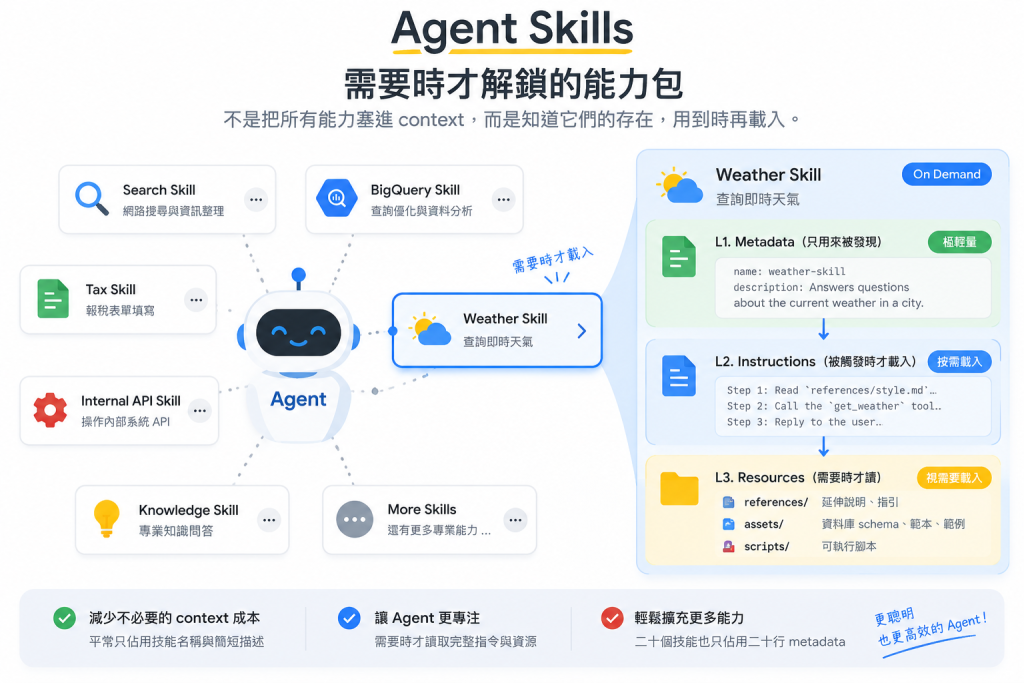
一個 Skill 是一個自足的功能單位,把完成某項任務所需的指令、資源、工具打包在一起,依 Agent Skill 規格 組織。它的結構設計成能漸進式載入,把對 agent context window 的影響降到最低。
SKILL.md 的 frontmatter,只包含 name 跟 description,只用來被發現,不會佔用太多 contextSKILL.md 的正文,只有在這個 skill 被觸發時才載入
references/(延伸的 Markdown 說明、workflow、指引)、assets/(資料庫 schema、API 文件、範本、範例)、scripts/(可執行腳本)這個三層設計的意義是:agent 一開始只看到每個 skill 的名字跟一句話描述(L1),真正判斷需要用某個 skill 時,才去讀它的完整指令(L2),而指令裡引用的參考資料、腳本(L3)則是連 agent 主動要求都要再進一步才會載入。二十個 skill 掛在 agent 上,平常只佔用二十行 metadata 的 context,而不是二十份完整說明書。
一個標準的 skill 目錄,除了 SKILL.md 是必要的,其他都是選配:
my_agent/
    agent.py (or agent.ts / main.go)
    .env
    skills/
        example-skill/        # Skill
            SKILL.md          # main instructions (required)
            references/
                REFERENCE.md  # detailed API reference
                FORMS.md      # form-filling guide
                *.md          # domain-specific information
            assets/
                *.*           # templates, images, data
            scripts/
                *.py          # utility scripts (Python)
                *.js          # utility scripts (JavaScript)
                *.ts          # utility scripts (TypeScript)
frontmatter 有兩組驗證規則,動手前先記住:
name 必須 ≤ 64 字元、全小寫 kebab-case(a-z、0-9、連字號),不能有頭尾或連續連字號;description 不能空白,且 ≤ 1024 字元。name 必須逐字等於 skill 所在的資料夾名稱。兩條加在一起,資料夾名也只能用連字號:叫 weather_skill 的話,name 寫底線會被 kebab-case 擋下,寫連字號又跟資料夾對不上,怎麼配都過不了。這些限制存在的理由很直接——name 會被當成識別碼與檔案系統路徑的一部分,description 則是 agent 判斷「要不要載入這個 skill」的唯一線索,太長反而稀釋了它的辨識度。
我們做一個最小的天氣 skill:一份指令、一份回答格式的參考文件、一個查天氣的工具。檔案長這樣:
my_agent/
    __init__.py               # from . import agent
    agent.py
    .env
    skills/
        weather-skill/
            SKILL.md
            references/
                style.md
SKILL.md---
name: weather-skill
description: Answers questions about the current weather in a city.
metadata:
adk_additional_tools:
- get_weather
---
Step 1: Read 'references/style.md' to learn how to format the answer.
Step 2: Call the `get_weather` tool with the city the user asked about.
Step 3: Reply to the user following the format in the reference.
--- 之間是 L1,下面的正文是 L2。metadata.adk_additional_tools 是這份檔案最容易漏掉的一行:它宣告「這個 skill 被啟用之後,要把哪些工具交給模型」。沒寫的話,你在程式碼裡掛再多工具,模型也永遠看不到。
references/style.md 是 L3,內容隨意:
# Answer format

Start with the city name, then the condition and temperature in °C.
Keep it to one sentence.
SkillToolset 把 skill 掛上 agentimport pathlib
from google.adk import Agent
from google.adk.skills import load_skill_from_dir
from google.adk.tools import skill_toolset
def get_weather(city: str) -> dict:
"""Returns the current weather for a given city."""
return {"city": city, "condition": "Sunny", "temperature_c": 22}
def show_tools(callback_context, llm_request):
print("tools visible to model:", sorted(llm_request.tools_dict))
weather_skill = load_skill_from_dir(
pathlib.Path(__file__).parent / "skills" / "weather-skill"
)
my_skill_toolset = skill_toolset.SkillToolset(
skills=[weather_skill],
additional_tools=[get_weather],
)
root_agent = Agent(
model="gemini-flash-latest",
name="skill_user_agent",
description="An agent that can use specialized skills.",
instruction=(
"You are a helpful assistant that can leverage skills to perform tasks."
),
tools=[
my_skill_toolset,
],
before_model_callback=show_tools,
)
get_weather 就是一個普通的 Python function,用寫死的資料代替真的天氣 API。additional_tools 裡的函式名稱要跟 SKILL.md 的 adk_additional_tools 對得上,ADK 靠名字把兩邊接起來。show_tools 是 Day 12 介紹過的 before_model_callback,每次呼叫模型前印出「這一輪模型看得到哪些工具」,等一下用它來驗證按需載入。
掛上 SkillToolset 之後,ADK 會自動附加一段系統指令,規定 agent 的行為紀律:
load_skill 讀取 skill 的指令,才能開始使用load_skill_resource
scripts/ 裡的腳本,得用 run_skill_script(agent 設了 code executor 才會出現)工具強制 agent 走「先發現、再讀指令、再視需要讀資源」的順序,這就是三層結構的具體實踐。
跟前面幾天一樣在 .env 設好金鑰,在 my_agent 的上一層執行 adk run my_agent,問它「What's the weather in Taipei?」。終端機會印出每一輪的工具清單:
tools visible to model: ['list_skills', 'load_skill', 'load_skill_resource']
tools visible to model: ['list_skills', 'load_skill', 'load_skill_resource']
tools visible to model: ['get_weather', 'list_skills', 'load_skill', 'load_skill_resource']
tools visible to model: ['get_weather', 'list_skills', 'load_skill', 'load_skill_resource']
tools visible to model: ['get_weather', 'list_skills', 'load_skill', 'load_skill_resource']
模型會先用 list_skills 拿到 skill 的名字跟描述(L1),判斷該用 weather-skill,呼叫 load_skill 讀進正文(L2),再用 load_skill_resource 讀 references/style.md(L3),最後才呼叫 get_weather。實際跑幾輪會隨模型判斷略有出入,但有一件事不會變:get_weather 一定是在 load_skill 之後才出現在清單裡。在那之前,模型連這個工具存在都不知道。
完整、官方維護的版本(含 inline skill 與腳本執行)可以對照 ADK Python repo 的 skills_agent 範例。
檔案系統來源就是上面的做法,load_skill_from_dir 讀一個符合 Agent Skill 規格結構的目錄。程式碼內嵌則是直接在程式碼裡定義:
from google.adk.skills import models

greeting_skill = models.Skill(
    frontmatter=models.Frontmatter(
        name="greeting-skill",
        description=(
            "A friendly greeting skill that can say hello to a specific person."
        ),
    ),
    instructions=(
        "Step 1: Read the 'references/hello_world.txt' file to understand how"
        " to greet the user. Step 2: Return a greeting based on the reference."
    ),
    resources=models.Resources(
        references={
            "hello_world.txt": "Hello! So glad to have you here!",
            "example.md": "This is an example reference.",
        },
    ),
)
官方也提到 Source 介面可以接任何資料儲存(例如資料庫),支援即時更新與個人化這類動態場景。這代表 skill 的來源不一定要是靜態檔案,可以做成「依使用者權限動態決定能載入哪些 skill」的架構,跟 Day 6 提過 BaseToolset 能拿到 ReadonlyContext 做動態工具集是同一種思路的延伸。
如果 skill 數量從幾十個成長到幾百、幾千個,靜態掛在專案裡的檔案系統模式會撐不住。Google Cloud Skill Registry 解決的正是這個規模問題——讓 agent 動態搜尋、發現、抓取一個中央目錄裡的遠端 skill,而不是在初始化時把所有可能用到的 skill 都塞進去。
動手前先把 Google Cloud 這一側準備好,少一項 GCPSkillRegistry 在建構時就會直接丟 ValueError:
gcloud auth application-default login
GOOGLE_CLOUD_PROJECT 設成專案 ID,GOOGLE_CLOUD_LOCATION 設成區域(例如 us-central1)準備好之後,把 GCPSkillRegistry 當成 registry 參數傳進 SkillToolset:
import os
from google.adk import Agent
from google.adk.integrations.skill_registry import GCPSkillRegistry
from google.adk.tools.skill_toolset import SkillToolset

registry = GCPSkillRegistry(
    project_id=os.environ.get("GOOGLE_CLOUD_PROJECT"),
    location=os.environ.get("GOOGLE_CLOUD_LOCATION", "us-central1"),
)

skill_toolset = SkillToolset(
    skills=[],
    registry=registry
)

agent = Agent(
    model="gemini-flash-latest",
    name="registry_agent",
    description="An agent that can dynamically discover and execute skills.",
    instruction="You are a helpful assistant. Use search_skills and load_skill to leverage remote capabilities.",
    tools=[skill_toolset],
)
配上 registry 之後,ADK 自動給 agent 兩個工具:
search_skills:對目錄做語意或關鍵字查詢,回傳符合的 skill metadataload_skill:抓取遠端 skill payload、解包、快取進 session state,讓後續對話不用重複打 API流程大致是:使用者問一個 agent 目前指令裡沒涵蓋的問題 → agent 呼叫 search_skills 找候選 → 挑一個 → 呼叫 load_skill 抓下來、快取、把指令交給模型 → 這個 skill 帶來的工具立刻可用。碰撞防護是內建的:registry 回傳的 skill 如果跟本地已載入的 skill 同名,ADK 會自動過濾掉,避免命名空間衝突。
部署時要留意網路:registry 是從 agent 所在的環境直接呼叫 Google Cloud API。如果部署環境擋了對外流量,search_skills 會回傳 REGISTRY_ERROR,agent 只剩本地預先掛好的 skill 能用。上線前先確認那台機器連得到 Google Cloud 的端點,否則 registry 這條路會悄悄失效。
Agent Skill 本身是一個開放規格(agentskills.io),不是 ADK 專屬的東西——Day 5 提過 Agents CLI 的 skills 也是照同一套規格打包的。這代表你今天寫的一個 skill,理論上不只能給 ADK agent 用,也能裝進支援 Agent Skill 規格的 coding agent 裡。
官方的 Community Resources 頁面列出了幾個延伸資源:Reddit 上的 r/agentdevelopmentkit 討論區、ADK Community Google Group(每月社群電話會議)、貢獻指南,以及中文、韓文、日文、西班牙文四種社群維護的文件翻譯。這頁多半是連結列表,想找現成的第三方整合,官網的 integrations 目錄會是更實際的入口。
Skill 的三層漸進載入,跟 Day 10 的 Context Compaction、Day 11 的 Context Caching 是同一個命題的三種解法——都是在解決「context window 有限,而你想給 agent 的知識很多」這件事。差別在於:Compaction 處理的是對話歷史會不會太長,Caching 處理的是重複內容要不要重新計費,而 Skill 處理的是能力說明書該不該一直待在 context 裡。三者可以同時用在同一個 agent 上,互不衝突。
Day 21 到 25 走完了 ADK 最「特種作戰」的一段:語音視訊互動(Live API Toolkit 三天,含 Session vs Live API session 的核心區分、RunConfig 的連線與成本控管、音訊格式與模型架構取捨)、無人值守的事件驅動架構(Ambient Agents)、貫穿整個 Runtime 的 Event Loop 機制、中斷恢復與主動取消(Resume 跟 Cancel,兩者支援的語言完全不重疊)、以及今天的按需載入能力包(Skills)。這五天涵蓋的功能有一個共同特徵——幾乎全部還在實驗或預覽階段,這不是巧合,是因為它們是 ADK 目前演進最快的前緣地帶。
明天開始進入最後一篇:實彈演習。評估、模擬、安全、觀測、部署——把前面二十五天寫出來的 agent,真正送上生產環境需要的最後一哩路。
Google ADK 官方網站
GitHub - Agent Development Kit (ADK) 2.0
GitHub 開源實作:https://github.com/SeanLinH/adk_tutor



 iThome鐵人賽
 看影片追技術